
AI app builder without credits: the pros and limits of bringing your own AI (BYO-AI)
Published November 1, 2026 · by NapBuild
Contents
NapBuild includes no AI credits. You connect the AI subscription you already pay for (Claude, ChatGPT through Codex, Grok or Gemini), and NapBuild puts it to work. That removes the credit meter that runs dry in the middle of a project. It does not remove limits: Claude and ChatGPT plans cap usage per period, and you need a Windows or Mac computer.
This page sets out what "without credits" really means, with the pricing and usage rules the builders publish themselves (all read on November 1, 2026).
What "without credits" means here
There are two models.
- Included AI. The builder sells you a plan with a pool of credits, tokens or messages. You pay one bill. When the pool is empty, you wait, top up or upgrade.
- Bring your own AI (BYO-AI). The builder sells the tool. The AI work runs on a subscription you hold with an AI company. You pay two bills. The limits that apply are the AI company’s.
NapBuild is the second model. Its home page says it runs "on your own AI subscription" with "no credits to buy". The connection happens on your own computer, and your login stays on your machine.
How the main builders count usage
This table compares entry-level paid plans, as published on November 1, 2026. It shows price and rules, not quality.
| Builder | Entry paid plan | Included | How usage is counted | When it runs out |
|---|---|---|---|---|
| Lovable | Pro, $25 a month ($21 a month billed yearly) | 100 credits a month | By the work done, not per message (examples on the page: 0.50 credit for a color change, 2.00 for a landing page with images) | Building stops. Add credits (top-ups on Pro) or wait |
| Bolt | Pro, $25 a month | 10M tokens a month | Tokens. Larger projects use more per message | Not stated for paid plans in the help article. Reload tokens exist on some plans |
| Rork | Pro, $20 a month | 100 credits a month | Roughly one request is one credit. Some actions cost extra | Upgrade or wait for the monthly reset |
| Anything | Pro, $19 a month | 20,000 credits a month | Variable by task complexity. Max and Thinking modes use more | Upgrade or buy top-off credits ($12 for 10,000) |
| Replit | Core, $20 a month ($18 billed yearly) | Monthly credits | Effort-based, depends on the request | Spending limits you set block paid usage. Credit packs exist |
| Base44 | Starter, $16 a month billed yearly | 100 message credits, 2,000 integration credits | No fixed amount per message. Set after the work is done | AI chat stops until reset or upgrade. Top-ups no longer sold |
| NapBuild | $24.90 a month (no AI included) | None | Your AI subscription’s own limits | Your AI plan’s limits. Optional budget per project |
Sources are listed at the bottom of the page. Details below.
What the builders say, one by one
Lovable
The Pro plan is $25 a month for 100 credits. Lovable says the cost depends on the complexity of the request and the work completed. It also says that when a workspace has no credits left, building stops and AI features in deployed apps stop. Pro and Business plans can buy top-ups, and unused monthly credits roll over for a limited time.
Bolt
Bolt measures work in tokens. Pro is $25 a month for 10 million tokens. Its help center says most of the usage comes from Bolt reading and syncing your project files, so a bigger project costs more per message. The free plan has a daily cap of 300K tokens. Token reloads exist, but only on some plans, and their price is not published on the pages we read. What happens at zero on a paid plan: not found.
Rork
Rork Pro is $20 a month for 100 credits. A credit is "roughly one request where Rork designs, builds, or edits your app". iOS builds and cloud simulator sessions cost extra. When you run out, the page says you can upgrade or wait for the monthly reset. It mentions no top-ups.
Anything
Pro is $19 a month for 20,000 credits. Every message uses credits and the number varies with task complexity. At the limit, you upgrade or buy top-off credits: $12 for 10,000, up to $240 for 200,000. Top-off credits do not expire. Monthly credits do not roll over.
Replit
Core is $20 a month ($18 billed yearly) with monthly credits. Replit uses effort-based pricing: the cost follows the complexity of the request. You can set spending limits, and when you reach one, usage-based services are blocked until the next billing cycle or until you raise it. What happens when included credits end and no limit is set: not found on the pages we read.
Base44
Starter is $16 a month billed yearly, with 100 message credits. Base44 says there is no fixed credit amount per message. Without credits you cannot send new messages in the AI chat until you have some again. It also states that credit top-ups can no longer be bought: you upgrade instead.
Most builders sell the same bargain: a fixed price, and an allowance that is counted by effort. The catch is that you often learn the cost of a request after it ran.
What BYO-AI fixes
- No credit meter from the builder. NapBuild does not count your messages. Nothing in NapBuild’s price depends on how many times you try.
- A predictable tool bill. NapBuild costs $24.90 a month, $119 a year or $299 once (prices as of November 1, 2026). Your AI bill is whatever plan you chose.
- The model you already trust. You use the Claude, ChatGPT, Grok or Gemini plan you hold, through Claude Code for Claude and Codex for ChatGPT.
- A hard cap if you want one. NapBuild lets you set an optional AI-work limit per project, and a hard cap on real money.
What BYO-AI does not fix
This is the part to read before you decide.
- You need an AI subscription first. If you have none, add its price to NapBuild’s.
- Your AI plan has limits, per period. Anthropic writes that every Claude plan has usage limits, with a rolling five-hour window and weekly limits on paid plans, and that Claude and Claude Code draw from the same limits. How fast you reach them depends on the model, the length of the chats and the size of the files. On Pro you can turn on extra usage credits to continue past the limit, which are paid on top.
- ChatGPT works the same way. OpenAI lists ChatGPT Plus at $20 a month and describes it as powering "a few focused coding sessions each week". Its usage estimates are per five-hour period and are "not fixed message limits". Plus and Pro users can buy extra credits.
- A long build uses a lot. NapBuild runs ten steps with judges and tests. We have not measured how much of a Claude Pro or ChatGPT Plus allowance a full app uses, and we found no figure per app from either company. Expect a large project to meet the limits of an entry plan. That is an expectation, not a result.
- You need a computer. NapBuild runs on Windows 10 or 11 or on a Mac, which stays on while the AI works. You follow the project from your phone. It is not a tool that lives only in a browser.
- The "no surprise bill" has a limit too. NapBuild adds no hidden charge, but your AI company’s own extra-usage credits can be turned on. Keep them off, or capped, if you want a fixed bill.
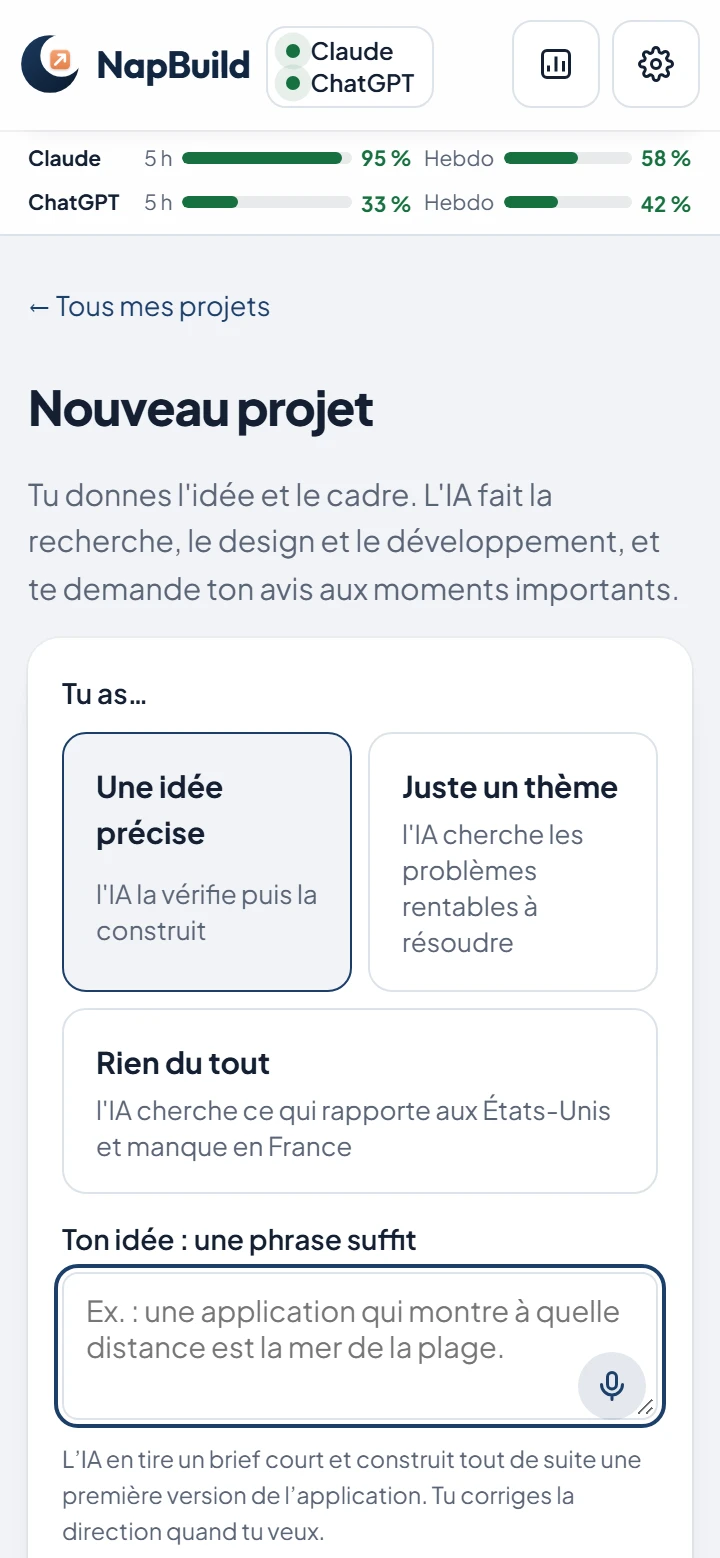
The screen above shows the top bar of the NapBuild app. It displays, for each connected AI, a gauge for the five-hour window and one for the week. The figures on it are an example.
The cost of one month of work
A fair "total cost of a month" cannot be computed for AI builders. No builder publishes how many credits or tokens a finished app costs, and we found no such figure from Anthropic or OpenAI either. What can be stated are the fixed prices. All amounts below are in US dollars, as officially published on November 1, 2026.
| Setup | Fixed monthly price | What it adds up to |
|---|---|---|
| NapBuild monthly + Claude Pro billed monthly | $24.90 + $20 | $44.90 |
| NapBuild monthly + Claude Pro billed yearly | $24.90 + $17 | $41.90 |
| NapBuild yearly ($9.92 a month) + Claude Pro billed yearly | $9.92 + $17 | $26.92 |
| NapBuild monthly + ChatGPT Plus | $24.90 + $20 | $44.90 |
| NapBuild monthly + Claude Max | $24.90 + $100 | $124.90 |
| Lovable Pro, Bolt Pro, Rork Pro, Anything Pro, Replit Core | $19 to $25 | AI included, up to the plan’s allowance |
Three things to read in it.
- For a light month, an included-AI plan at $19 to $25 can cost less than NapBuild plus an AI plan.
- NapBuild’s checkout was not open on its home page on November 1, 2026. You can try everything for 48 hours without a card, and steps 1 to 3 (idea, market, identity) stay available without paying.
- Grok and Gemini subscription prices and limits were not checked for this page.
Which one should you choose?
Solo founder with an idea and no code
If you already pay for Claude or ChatGPT, NapBuild adds a tool on top of a plan you hold, and it takes the app all the way to Google Play and the App Store (the stores decide whether to accept it, and the developer accounts are yours: $25 once at Google, $99 a year at Apple). If you only want a web prototype in a few minutes, an included-AI builder in the browser is simpler.
Non-developer with a budget
If you want one bill, nothing to install and a hosted app with its database, Lovable, Base44 or Replit fit better. Choose NapBuild if you want a finished mobile app and accept two subscriptions and a computer.
Freelancer or agency
If your team wants React code to edit by hand, a browser builder with code export suits you better. If you ship many apps, compare the AI plan you would need (Max-level, say) with the credits pool you would otherwise buy. We have no figure for that usage. Test it in the 48 hours.
For a wider comparison of builders, see Lovable vs Bolt vs NapBuild. The ten steps are described in the NapBuild route, and the prices in pricing.
Questions
Is NapBuild an AI app builder with no usage limits?
No. NapBuild sells no credits, so it adds no limit of its own to count, but the Claude, ChatGPT, Grok or Gemini plan you connect has its own limits, per period. Anthropic and OpenAI both state it on their pricing pages.
Can I use a free AI plan with NapBuild?
The home page says you connect a subscription. OpenAI says Codex is included in ChatGPT Free, which it describes as for "quick coding tasks". We did not test NapBuild on a free AI plan, so we do not claim it works well there.
Which AI should I connect?
Claude (through the official Claude Code) and ChatGPT (through Codex) are the two we checked for this page. Grok and Gemini are also supported, and we did not review their plans here.
What if I hit my AI plan’s limit during a build?
You wait for the window to reset, upgrade your AI plan, or enable extra usage with the AI company. NapBuild’s own budget setting only limits what a project may use.
Does NapBuild guarantee the app is accepted by Google Play or the App Store?
No. NapBuild prepares and submits the app, and the stores decide.
Take a nap. Build an app. NapBuild researches the market, designs, codes, tests, writes the store listing and ships your app, on your own AI subscription. Try it free for 48 hours.
See how NapBuild worksSources
- Plans and creditsLovable (documentation) · read November 1, 2026
- Subscription plansLovable (documentation) · read November 1, 2026
- PricingBolt · read November 1, 2026
- Tokens (help center)Bolt · read November 1, 2026
- SubscriptionsRork (documentation) · read November 1, 2026
- PricingAnything · read November 1, 2026
- CreditsAnything (documentation) · read November 1, 2026
- PricingReplit · read November 1, 2026
- Replit AI billingReplit (documentation) · read November 1, 2026
- Managing your spendReplit (documentation) · read November 1, 2026
- PricingBase44 · read November 1, 2026
- CreditsBase44 (documentation) · read November 1, 2026
- Credit top-upsBase44 (documentation) · read November 1, 2026
- Plans and pricingAnthropic (Claude) · read November 1, 2026
- Using Claude Code with your Pro or Max planAnthropic (help center) · read November 1, 2026
- Codex pricing and usage limitsOpenAI · read November 1, 2026
Written by NapBuild with help from AI, from the sources above, read on the dates shown. NapBuild is one of the products compared: we are not neutral, so every competitor fact links to its official page.